

Executive Summary: Bank of America Statement Parsing
Bank of America (BofA) serves more than 69 million consumer and small business clients worldwide. As one of the core pillars of American commercial banking, BofA accounts represent a staple in small business bookkeeping, corporate audits, and multi-entity tax filing.
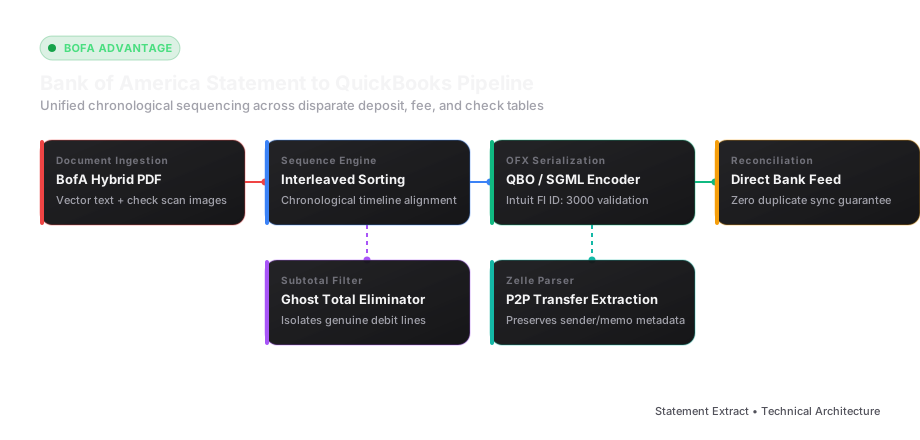
Unlike financial institutions that generate purely sequential chronological transaction tables, Bank of America partitions monthly checking and commercial accounts into compartmentalized activity streams:
- Deposits and other credits
- Customer withdrawals and transfers
- Checks paid and image records
- Service fees and interest accruals
When accountants attempt to convert BofA PDF statements to Excel using off-the-shelf PDF parsers, these disconnected sections are extracted in vertical isolation. This shatters the chronological timeline of the account, rendering month-end bank reconciliation virtually impossible without hours of manual cut-and-paste sorting.
This technical guide provides an exhaustive breakdown of Bank of America statement layouts, explains how to systematically eliminate ghost subtotal lines, and details how to convert BofA PDFs into direct-import QuickBooks Online (.QBO) and clean Excel files.
The Morphology of a Bank of America Statement
Bank of America statements are designed primarily for visual print clarity rather than automated optical ingestion. A comprehensive review of BofA's layout architecture reveals several distinct structural characteristics:
1. The Header Summary and Account Identifier
At the top of Page 1, Bank of America prints a standardized summary panel:
- Account Name and Mailing Address
- Statement Period (e.g.,
January 1, 2026 to January 31, 2026) - Account Number (displayed with leading zeroes:
0000 1234 5678) - Starting Balance, Total Deposits, Total Other Subtractions, Checks, Service Fees, and Ending Balance.
Your Checking Account                     Account Number: 0000 1234 5678
-------------------------------------------------------------------------
Beginning balance on January 1, 2026                           $24,150.80
Deposits and other credits                                      38,420.00
Withdrawals and other debits                                   -14,920.15
Checks                                                          -6,310.40
Service fees                                                       -35.00
Ending balance on January 31, 2026                             $41,305.25
2. Disparate Transaction Activity Sections
The core challenge in parsing BofA statements is that transactions are divided by classification rather than sorted chronologically:
A. Deposits and Other Credits
Contains all inbound funds. The table provides:
Date(e.g.,01/05)Description(e.g.,Zelle transfer from ACME Corp Confirmation# 99482019)Amount(e.g.,4,500.00)
B. Withdrawals and Other Debits
Contains outbound electronic wires, ACH automatic debits, bill pay drafts, and debit card purchases. The format mirrors the deposits table, but all amounts represent reductions to the ledger.
C. Checks Paid Table
BofA formats cleared paper checks in a multi-column horizontal matrix, similar to Chase, listing:
DateCheck NumberAmount
A critical obstacle here is the presence of an asterisk symbol (*) adjacent to non-sequential check numbers (e.g., Check #1042*). Generic OCR engines frequently misread this symbol as a footnote reference, a numeral 1, or drop the preceding digit entirely.
Technical Conversion Pitfalls & Solutions
1. Eliminating Ghost Subtotals and Section Footers
At the bottom of each activity section, Bank of America inserts summary rows that display the sum of transactions for that specific category:
Total deposits and other credits                             $38,420.00
Total withdrawals and other debits                           $14,920.15
Total checks                                                  $6,310.40
If an extraction algorithm treats these summary rows as normal transaction lines, the resulting Excel spreadsheet will double-count all debits and credits, immediately throwing the trial balance out of alignment. Robust parser logic applies keyword-based regex filters that intercept and purge any row containing the tokens Total deposits, Total withdrawals, or Total other credits.
2. Capturing Multi-Line Zelle and Wire Transfer Narratives
Bank of America statements feature verbose narratives for electronic transfers. A single Zelle transaction routinely occupies three physical lines:
01/18  BKOFAMERICA MOBILE 01/18 14:22                    $1,250.00
       ZELLE TRANSFER TO JOHN DOE
       CONFIRMATION# 18294029482 REF# 20260118004
If parsed line-by-line, the crucial payee identity (JOHN DOE) and confirmation code are separated from the dollar amount. The parsing pipeline must evaluate vertical line spacing (line-height < 1.4em) and merge consecutive continuation strings into a single descriptive string before exporting to Excel.
3. Chronological Interleaved Timeline Reconstruction
Because BofA groups transactions by type, a deposit on January 31 appears on Page 2, while a debit that occurred on January 2 appears on Page 4. To produce a true general ledger journal, an extraction engine must:
- Extract all records into a single unified staging array.
- Normalize all dates into standard ISO 8601 (
YYYY-MM-DD). - Re-sort all records by posting date.
- Calculate running balances sequentially from Beginning Balance to Ending Balance.
Direct QuickBooks Web Connect (.QBO) Formatting
When importing Bank of America statement data into QuickBooks Online or QuickBooks Desktop, bookkeepers prefer the native .QBO Web Connect file format over generic CSVs. A .QBO file automatically matches existing transactions, avoids manual column mapping, and prevents duplicate entries.
To generate a valid BofA-compatible QBO file, the following XML/SGML headers are required:
OFXHEADER:100
DATA:OFXSGML
VERSION:102
SECURITY:NONE
ENCODING:USASCII
CHARSET:1252
COMPRESSION:NONE
OLDFILEUID:NONE
NEWFILEUID:NONE

<OFX>
  <SIGNONMSGSRSV1>
    <SONRS>
      <STATUS>
        <CODE>0
        <SEVERITY>INFO
      </STATUS>
      <DTSERVER>20260131120000
      <LANGUAGE>ENG
      <FI>
        <ORG>Bank of America
        <FID>3000
      </FI>
      <INTU.BID>3000
    </SONRS>
  </SIGNONMSGSRSV1>
  <BANKMSGSRSV1>
    <STMTTRNRS>
      <TRNUID>20260131001
      <STATUS>
        <CODE>0
        <SEVERITY>INFO
      </STATUS>
      <STMTRS>
        <CURDEF>USD
        <BANKACCTFROM>
          <BANKID>051000017
          <ACCTID>000012345678
          <ACCTTYPE>CHECKING
        </BANKACCTFROM>
        <BANKTRANLIST>
          <DTSTART>20260101000000
          <DTEND>20260131235959
          <STMTTRN>
            <TRNTYPE>CREDIT
            <DTPOSTED>20260105120000
            <TRNAMT>4500.00
            <FITID>20260105001
            <NAME>ZELLE TRANSFER FROM ACME CORP
          </STMTTRN>
          <STMTTRN>
            <TRNTYPE>DEBIT
            <DTPOSTED>20260118120000
            <TRNAMT>-1250.00
            <FITID>20260118002
            <NAME>ZELLE TRANSFER TO JOHN DOE
          </STMTTRN>
        </BANKTRANLIST>
        <LEDGERBAL>
          <BALAMT>41305.25
          <DTASOF>20260131235959
        </LEDGERBAL>
      </STMTRS>
    </STMTTRNRS>
  </BANKMSGSRSV1>
</OFX>
Critical Note on Intuit BID: QuickBooks validates the
<INTU.BID>tag during import. Using Bank of America's designated Financial Institution identifier (3000) ensures seamless bank feed synchronization.
Step-by-Step Accounting Workflow: From PDF to Reconciled Ledger
- Batch Upload: Upload all 12 monthly Bank of America PDF statements for the fiscal year into the converter.
- Automated Balance Validation: Ensure the mathematical checksum validates for each monthly statement: $$\text{Starting Balance} + \text{Deposits} - \text{Withdrawals} - \text{Checks} - \text{Fees} = \text{Ending Balance}$$
- Export Selection: Select QuickBooks QBO for one-click banking feed import, or Excel (.xlsx) for complex audit schedules.
- Import to Accounting Software:
- In QuickBooks Online: Navigate to Transactions > Bank transactions, click Upload transactions, and choose the generated
.qbofile. - In Xero: Navigate to Accounting > Bank accounts, click Manage Account > Import a Statement, and select the converted
.csvfile.
- In QuickBooks Online: Navigate to Transactions > Bank transactions, click Upload transactions, and choose the generated
- Reconciliation Audit: Run the standard monthly bank reconciliation report to confirm that the ending statement balance precisely matches the ledger register.
Detailed Examination: BofA Merchant Services & Fee Structure Extraction
For e-commerce brands, medical practices, and retail businesses utilizing Bank of America Merchant Services, statement reconciliation presents significant complexity. Monthly statements contain detailed breakdowns of interchange pass-through fees, batch settlement withholdings, and chargeback adjustments that must be accurately booked:
1. Daily Gross vs. Net Batch Settlements
Bank of America Merchant Services can be configured in two distinct clearing modes:
- Gross Settlement: The total daily sales volume is deposited in full (e.g.,
+$14,250.00), and merchant processing fees are debited as a single lump sum at month-end. - Net Settlement: Bank of America automatically deducts interchange fees, assessment fees, and merchant discount rates (MDR) from each daily batch prior to deposit (e.g., depositing
+$13,842.15instead of$14,250.00). - Bookkeeping Implication: When net settlement is active, extracting the bank statement alone will understate gross corporate revenue and understate merchant processing expense. A comprehensive audit schedule extracts both the net deposit from the checking section and cross-references the merchant fee annex on Page 6 to book the necessary grossing-up journal entries.
2. Deconstructing BofA Business Advantage Sub-Accounts
Bank of America Business Advantage banking relationships often include linked savings and sweep facilities:
- Cash Flow Monitor: BofA statements feature a graphic chart summarizing cash inflows versus outflows. This visual graph must be bypassed by parsing engines to prevent text artifacts from polluting active transaction rows.
- Sweep Transfers: Automatic overnight transfers between operating checking accounts and secondary high-yield investment accounts appear as "Transfer to Secondary Account". These entries must be tagged as internal liquidity transfers rather than vendor expenditures.
Comprehensive BofA Error Code & Resolution Table
When uploading converted Bank of America data to QuickBooks, accountants frequently encounter format errors. Below is the master diagnostic guide:
| Error Symptom | Technical Root Cause | Automated Resolution Strategy |
|---|---|---|
| QuickBooks Error OL-221 | The <INTU.BID> tag is missing or set to an invalid ID. | Replace tag with Bank of America's certified Intuit BID: <INTU.BID>3000. |
| Duplicate Opening Balance | The QBO file includes an extra <LEDGERBAL> date stamp that QuickBooks misinterprets as an opening transaction. | Ensure the opening balance is reconciled via the register setup, not as an active line item. |
| Mismatched Signage (+/-) | Deposits appear as expenses and debits appear as income. | Validate that <TRNTYPE>DEBIT tags contain negative amounts (-125.00) and <TRNTYPE>CREDIT tags contain positive amounts. |
| Truncated Payee Names | Merchant names cut off after 32 characters in QuickBooks. | Map full narrative strings into the <MEMO> tag while placing the normalized vendor name in the <NAME> tag. |
Step-by-Step Manual Verification in Microsoft Excel
If you prefer validating converted BofA data in Excel before GL commitment:
- Open the converted
.xlsxfile and insert a new column titledCalculated Balance. - In row 2, set the formula to
=Starting_Balance + Credit_Amount - Debit_Amount. - In row 3, set the relative formula to
=F2 + E3 - D3and fill down across all transaction rows. - Compare the final calculated cell against Bank of America's published Ending Balance. If
Final_Calculated - Published_Ending == $0.00, your dataset is certified mathematically sound.
Advanced Forensic Auditing: Reconciling Bank of America Merchant Services
For retail, healthcare, and hospitality businesses that accept customer credit cards through Bank of America Merchant Services, statement reconciliation requires deep multi-layered auditing:
1. Interchange-Plus Pricing vs. Flat-Rate Processing
Bank of America statements delineate interchange pass-through costs assessed by the payment networks (Visa, Mastercard, Discover, American Express) from BofA's processor markup:
- Dues & Assessments: Fixed basis points and per-transaction fees remitted to card networks (e.g., Visa Network Access and Settlement Assessment fee of 0.0195%).
- Processor Markup: BofA's contractual margin, typically 10 to 30 basis points plus $0.05 to $0.10 per authorization.
- Chargeback & Retrieval Requests: When a consumer disputes a charge, Bank of America debits the merchant account for both the disputed amount and a $15 to $25 chargeback fee.
- Audit Strategy: Ensure that chargebacks are not booked as general operational expense, but rather routed to a dedicated "Disputed Revenue & Chargebacks" contra-revenue account for managerial visibility.
2. Complete Bank of America QBO Import Workflow for CPAs
Follow this battle-tested SOP when reconciling annual BofA records in QuickBooks Online:
- Consolidated Statement Partitioning: If your client submits a single 60-page PDF covering January through December, use our automated converter to partition the file into 12 individual monthly QBO Web Connect packages.
- Batch Upload Sequence: Upload the monthly files in strict chronological sequence (January first, February second) to ensure bank feed matching algorithms learn recurring vendor rules accurately.
- Register Balance Lock: After reconciling December 31, navigate to Settings > Advanced > Accounting in QuickBooks and enable Close the books with a password. This locks the reconciled Bank of America register, preventing clients from accidentally modifying past transactions during subsequent tax years.
- Permanent Digital Archiving: Store the converted
.xlsxfiles alongside the source Bank of America PDFs in your firm's encrypted document repository with 7-year IRS audit retention tags.
Technical Appendix: Advanced Exception Handling & Reversing Entry Management
When managing high-volume Bank of America commercial accounts, bookkeepers frequently encounter reversing entries, stop-payment notices, and electronic chargebacks. A reversing entry occurs when Bank of America corrects a processing clerical error or credits back a disputed charge. On the statement, this appears as an offset transaction with matching dollar values but opposite debits or credits.
An automated financial conversion pipeline must detect and flag paired offsetting transactions. If Bank of America posts a $4,500.00 debit on March 12 followed by a $4,500.00 reversal credit on March 13, both records must be extracted with their unique sequence reference numbers to maintain an immutable general ledger audit trail. Failing to extract reversing entries distorts gross cash turnover and introduces unexplained reconciling variances into month-end trial balances.
Furthermore, when dealing with Bank of America line-of-credit sweep facilities, interest calculations are calculated on average daily collected balances rather than closing ledger balances. Accountants can use the converted Excel dataset to verify that BofA's billed finance charges precisely match contractual prime rate spreads, identifying bank overcharges and safeguarding enterprise capital.


