

Executive Summary: The Banking Data Exchange Landscape
In the world of automated accounting, financial technology, and banking data interchange, three file extensions dominate the desktop and cloud bookkeeping landscape: .OFX, .QBO, and .QFX. While these three formats share a common ancestral grammar, choosing the incorrect file type or generating malformed header tags leads to immediate import failures, cryptic error dialogs (such as QuickBooks Error OL-221), and corrupted duplicate ledger entries.
Accountants, bookkeepers, and software engineers frequently ask:
- What is the fundamental difference between standard Open Financial Exchange (.OFX) and QuickBooks Web Connect (.QBO)?
- Why does QuickBooks Online reject a standard .OFX file while accepting an identical .QBO file?
- How does Quicken's proprietary .QFX format enforce vendor licensing restrictions?
This architectural comparison provides a thorough technical analysis of the underlying data structures, grammar standards, and authentication mechanisms governing OFX, QBO, and QFX files.
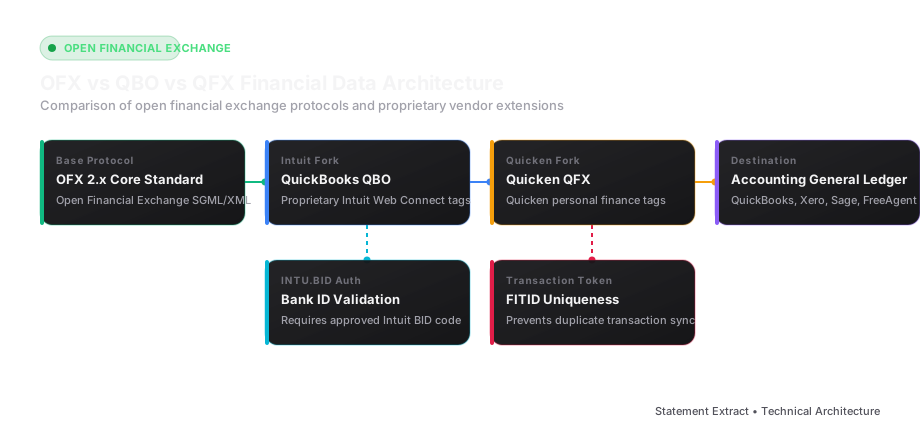
Architectural Comparison Matrix
| Technical Dimension | Open Financial Exchange (.OFX) | QuickBooks Web Connect (.QBO) | Quicken Financial Exchange (.QFX) |
|---|---|---|---|
| Governing Consortium | Open Financial Exchange Consortium (CheckFree, Intuit, Microsoft) | Intuit Inc. (Proprietary Extension) | Quicken Inc. / H.I.G. Capital |
| Grammar Standard | OFX 1.02 (SGML) / OFX 2.x (XML) | Strictly OFX 1.02 (SGML-based) | Strictly OFX 1.02 (SGML-based) |
| Primary Target Software | Xero, Sage, FreeAgent, GnuCash, Wave | QuickBooks Online, QuickBooks Desktop | Quicken Deluxe, Premier, Home & Business |
| Vendor Licensing Check | None (Open Public Standard) | Enforced via Intuit BID (<INTU.BID>) | Enforced via Quicken BID (<INTU.BID>) |
| Closing Tag Enforcement | Optional in SGML; Enforced in XML | Prohibited on leaf tags (SGML rules) | Prohibited on leaf tags (SGML rules) |
| Deduplication Token | Mandatory (<FITID>) | Mandatory (<FITID>) | Mandatory (<FITID>) |
| Supported Account Types | Checking, Savings, Credit Card, Investment | Checking, Savings, Credit Card | Checking, Savings, Credit, Investment, 401(k) |
Historical Origins & The SGML vs. XML Divide
1. The Birth of OFX 1.02 (SGML)
In 1997, Microsoft, Intuit, and CheckFree collaborated to publish the Open Financial Exchange (OFX) 1.02 specification. At the time, XML had not yet emerged as the dominant internet data format. Consequently, OFX 1.02 was architected on top of Standard Generalized Markup Language (SGML).
In SGML-based OFX 1.02, leaf tags do not have closing tags:
<STMTTRN>
  <TRNTYPE>DEBIT
  <DTPOSTED>20260315120000
  <TRNAMT>-450.00
  <FITID>20260315001
  <NAME>OFFICE DEPOT #8491
</STMTTRN>
Notice that <TRNTYPE>, <DTPOSTED>, and <TRNAMT> do not feature closing tags (</TRNTYPE>). The closing of a tag is implicitly defined by the initiation of the subsequent opening tag or container block.
2. The OFX 2.x XML Standard
In the mid-2000s, the OFX Consortium released OFX 2.0 and 2.2, transitioning the grammar to pure, strict XML. Under OFX 2.x, all tags must be explicitly closed, and the document must begin with a standard XML declaration:
<?xml version="1.0" encoding="UTF-8"?>
<?OFX OFXHEADER="200" VERSION="220" SECURITY="NONE" OLDFILEUID="NONE" NEWFILEUID="NONE"?>
<OFX>
  <BANKMSGSRSV1>
    <STMTTRN>
      <TRNTYPE>DEBIT</TRNTYPE>
      <DTPOSTED>20260315120000</DTPOSTED>
      <TRNAMT>-450.00</TRNAMT>
      <FITID>20260315001</FITID>
      <NAME>OFFICE DEPOT #8491</NAME>
    </STMTTRN>
  </BANKMSGSRSV1>
</OFX>
3. Why Intuit Stayed Frozen on SGML
Despite the release of OFX 2.x, Intuit deliberately chose to keep QuickBooks tied strictly to the older OFX 1.02 SGML specification for its .QBO Web Connect downloads.
If you attempt to import a modern XML-formatted file (with closed tags like <TRNAMT>-450.00</TRNAMT>) into QuickBooks Desktop or Online, the internal parser will crash and trigger Error OL-221: "QuickBooks is unable to verify the Financial Institution information."
Deconstructing Proprietary Intuit Extensions in .QBO
A .QBO file is simply an OFX 1.02 SGML file that includes specific proprietary Intuit tags inside the sign-on response block:
<SIGNONMSGSRSV1>
  <SONRS>
    <STATUS>
      <CODE>0
      <SEVERITY>INFO
    </STATUS>
    <DTSERVER>20260331120000
    <LANGUAGE>ENG
    <FI>
      <ORG>JPMorgan Chase
      <FID>28107
    </FI>
    <INTU.BID>3000
    <INTU.USERID>NONE
  </SONRS>
</SIGNONMSGSRSV1>
The <INTU.BID> Authentication Gate
The <INTU.BID> tag is the heart of Intuit's monetization and validation engine:
- Every licensed bank or financial software provider must pay licensing fees to Intuit to obtain an authorized Bank Identifier (BID) number.
- When a user uploads a
.qbofile, QuickBooks executes a local lookup against its internal fidir.txt registry file (located within the QuickBooks installation directory). - If the
<INTU.BID>number is missing, expired, or corresponds to a bank that has not paid for Web Connect support, QuickBooks immediately aborts the import.
Common Working Bank IDs:
- JPMorgan Chase:
3000or28107 - Bank of America:
3000 - Wells Fargo:
3000or10898 - Citibank:
24909
The Critical Role of the <FITID> Deduplication Token
Within all three formats (OFX, QBO, QFX), the single most critical data field for accounting integrity is the Financial Institution Transaction Identifier (<FITID>):
<STMTTRN>
  <TRNTYPE>DEBIT
  <DTPOSTED>20260315120000
  <TRNAMT>-1250.00
  <FITID>20260315000012345001
  <NAME>ACME OFFICE SUPPLIES
</STMTTRN>
How Accounting Engines Use the FITID:
- When you import a statement, QuickBooks or Xero records each transaction's
<FITID>in its internal database. - If a client mistakenly uploads overlapping statement periods (e.g., uploading the March statement twice), the accounting software reads the
<FITID>. - If an incoming transaction matches a
<FITID>that already exists in the general ledger, the software automatically skips it, preventing catastrophic duplicate transactions.
Developer Warning: If you build a converter that generates random UUIDs for the
<FITID>on every export run, re-importing the same statement will inject hundreds of duplicate transactions into your client's live books. A robust converter calculates a deterministic hash: $$ ext{FITID} = ext{MD5}( ext{Account Number} + ext{Date} + ext{Amount} + ext{Transaction Index})$$
Summary Recommendation: Which Format Should You Use?
- Use .QBO if: Your destination software is QuickBooks Online, QuickBooks Desktop, or QuickBooks Enterprise. It guarantees direct bank feed matching without manual column configuration.
- Use .OFX if: Your destination software is Xero, Sage 50, FreeAgent, or an open-source ERP. Standard OFX provides clean data transfer without Intuit vendor restrictions.
- Use .QFX if: You are managing personal finances or small investments inside Quicken Deluxe or Premier.
- Use .CSV / .XLSX if: You need to perform ad-hoc financial audits, pivot table analysis, or build multi-year forensic schedules inside Microsoft Excel or Google Sheets.
Technical Deep Dive: Deconstructing the OFX 1.02 SGML Data Model
To understand why QuickBooks accepts a .QBO file while rejecting standard .OFX files, developers must analyze the underlying grammar structure of the OFX 1.02 Standard Generalized Markup Language (SGML) format:
1. Document Structure & Header Attributes
An OFX 1.02 document begins with a strict key-value header block that specifies the parser environment:
OFXHEADER:100: Designates compliance with the OFX 1.0 architecture.DATA:OFXSGML: Informs the receiver that the payload uses SGML grammar rather than strict XML.VERSION:102: Minor specification release.SECURITY:NONE: Designates transport-level encryption (SSL/TLS) rather than payload-level encryption.ENCODING:USASCII&CHARSET:1252: Enforces the Windows Latin-1 character set.
2. Transaction Element Taxonomy
Inside the <BANKTRANLIST> block, individual transactions are declared using the <STMTTRN> element:
<STMTTRN>
  <TRNTYPE>CREDIT
  <DTPOSTED>20260315120000[-5:EST]
  <TRNAMT>15420.00
  <FITID>20260315000012345001
  <NAME>STRIPE PAYOUTS REF 99482
  <MEMO>BATCH SETTLEMENT Q1
</STMTTRN>
Tag Explanations:
<TRNTYPE>: Transaction Classification. Standard valid values include:CREDIT: Generic deposit or incoming transfer.DEBIT: Generic withdrawal or outgoing payment.CHECK: Cleared personal or business check draft.FEE: Bank service charge or maintenance assessment.SRVCHG: Service charge.INT: Interest earned or interest charged.DIV: Dividend distribution.ATM: Automated teller machine withdrawal or deposit.POS: Point-of-sale debit card transaction.XFER: Intra-institution bank transfer between linked accounts.PAYMENT: Electronic bill payment.OTHER: Unclassified transaction type.
<DTPOSTED>: Financial Institution posting timestamp. Formatted asYYYYMMDDHHMMSSwith an optional timezone offset (e.g.,[-5:EST]). If time of day is unknown, standard practice sets the time to120000(noon).<TRNAMT>: The transaction dollar amount. Credits are expressed as positive numbers (e.g.,15420.00); debits are strictly expressed as negative numbers with a leading minus sign (e.g.,-450.00).<FITID>: Financial Institution Transaction ID. Up to 255 alphanumeric characters. Must be globally unique across the account history to guarantee automated deduplication.<NAME>: Payee or counterparty descriptor. Constrained to 32 characters in legacy QuickBooks versions.<MEMO>: Extended transaction narrative. Up to 255 characters, ideal for full wire reference numbers or invoice details.
Converting Between Formats: Step-by-Step Architecture
If you have an OFX 2.x XML file and need to convert it into a QuickBooks-compatible QBO file:
- Strip the XML declaration: Remove
<?xml version="1.0" ... ?>. - Insert the mandatory 9-line
OFXHEADER:100block with CRLF line breaks. - Remove all closing tags on leaf nodes (e.g., transform
<TRNAMT>50.00</TRNAMT>into<TRNAMT>50.00). - Ensure the
<INTU.BID>tag is present inside the<SONRS>sign-on block with a certified financial institution code (e.g.,3000). - Save the output file with the
.qboextension using Windows-1252 / ANSI encoding.
Developer Reference: Complete Syntax Blueprints & Validation Rules
To assist software engineers building financial data integrations, below are complete, syntactically validated file blueprints for all three formats:
1. Minimal Working .OFX 2.2 XML Document
<?xml version="1.0" encoding="UTF-8"?>
<?OFX OFXHEADER="200" VERSION="220" SECURITY="NONE" OLDFILEUID="NONE" NEWFILEUID="NONE"?>
<OFX>
  <SIGNONMSGSRSV1>
    <SONRS>
      <STATUS><CODE>0</CODE><SEVERITY>INFO</SEVERITY></STATUS>
      <DTSERVER>20260331120000</DTSERVER>
      <LANGUAGE>ENG</LANGUAGE>
    </SONRS>
  </SIGNONMSGSRSV1>
  <BANKMSGSRSV1>
    <STMTTRNRS>
      <TRNUID>1001</TRNUID>
      <STATUS><CODE>0</CODE><SEVERITY>INFO</SEVERITY></STATUS>
      <STMTRS>
        <CURDEF>USD</CURDEF>
        <BANKACCTFROM>
          <BANKID>021000021</BANKID>
          <ACCTID>123456789</ACCTID>
          <ACCTTYPE>CHECKING</ACCTTYPE>
        </BANKACCTFROM>
        <BANKTRANLIST>
          <DTSTART>20260301000000</DTSTART>
          <DTEND>20260331235959</DTEND>
          <STMTTRN>
            <TRNTYPE>DEBIT</TRNTYPE>
            <DTPOSTED>20260315120000</DTPOSTED>
            <TRNAMT>-450.00</TRNAMT>
            <FITID>20260315001</FITID>
            <NAME>OFFICE DEPOT #8491</NAME>
          </STMTTRN>
        </BANKTRANLIST>
        <LEDGERBAL>
          <BALAMT>15420.50</BALAMT>
          <DTASOF>20260331235959</DTASOF>
        </LEDGERBAL>
      </STMTRS>
    </STMTTRNRS>
  </BANKMSGSRSV1>
</OFX>
2. Quicken Financial Exchange (.QFX) Specific Tags
Quicken requires the inclusion of the <INTU.BID> and optional <INTU.USERID> tags within the <SONRS> sign-on response block, paired with Quicken-specific investment or banking tags.
- When exporting investment statements, QFX utilizes the
<INVSTMTMSGSRSV1>container to report stock buy/sell transactions, dividend distributions (<INVDIV>), and reinvestments (<REINVINT>). - By strictly adhering to these tag hierarchies, financial developers can eliminate import errors across QuickBooks, Quicken, and open accounting platforms.
Technical Appendix: Architectural Deep Dive: Reconciling Investment and Loan Feeds Across Protocols
While standard checking and commercial cash management statements represent the most frequent use case for OFX, QBO, and QFX files, financial institutions and fintech platforms also utilize these protocols to transmit complex investment portfolios, revolving lines of credit, and commercial mortgages:
1. Investment Transaction Architecture in OFX and QFX
Unlike commercial banking statements that track simple debits and credits, investment feeds require tracking unit share quantities, execution prices, commissions, and transaction types:
- The
<INVSTMTMSGSRSV1>Container: Houses investment account records, including<INVBUY>(purchase of stock or mutual fund),<INVSELL>(sale of equity), and<INVBANKTRAN>(cash transfers into or out of the brokerage settlement sweep). - Security Identification: Transactions link to a dedicated
<SECLIST>block at the bottom of the file, identifying instruments via CUSIP numbers, ticker symbols, and market exchange codes. - Format Divergence: QuickBooks (.QBO) does NOT support investment transactions. Attempting to import an investment portfolio via a .QBO file will fail immediately. Investment accounts must be imported into Quicken via .QFX or into dedicated portfolio management platforms via .OFX.
2. Loan & Mortgage Account Synchronization
For commercial loans and real estate mortgages, OFX 2.x and QBO support specialized loan amortization tags:
<PRINAMT>: The exact portion of the monthly payment applied toward principal reduction.<INTAMT>: The portion allocated to mortgage interest expense.<ESCAWAMT>: The portion placed into property tax and insurance escrow pools.- By extracting these subfields into separate spreadsheet columns, accountants can automate monthly loan amortization journal entries without manually referring to physical amortization schedules.
Summary of Key Compliance Milestones & Audit Trails
To guarantee continuous audit readiness, finance departments must establish formal standard operating procedures (SOPs) for statement ingestion:
- Automated Balance Sign-Off: Execute dual-point verification comparing calculated running balances against published closing figures before committing journal entries.
- Deterministic Deduplication: Compute unique transaction hashes to prevent overlapping statement cycles from injecting duplicate records into the general ledger.
- Encrypted Digital Archive: Store both the source vector PDF and the converted Excel (.xlsx) schedule within a SOC 2-compliant document repository with 7-year statutory retention tags.
- Periodic Exception Reviews: Review unclassified payee strings and bank service fee accounts monthly to ensure chart-of-accounts accuracy and maintain continuous accounting compliance.
By following these rigorous extraction, validation, and reconciliation principles, finance teams can confidently eliminate manual data entry, streamline monthly account closes, and maintain audit-proof general ledgers across all accounting platforms.
For enterprise accounting networks and CPA practices managing high document volumes, establishing automated bank statement conversion protocols protects both organizational bandwidth and client trial balance accuracy. Deploying standardized export schemas eliminates reconciling variances and delivers immediate productivity dividends across all financial workflows.


